

REELHIVE / AUTOREEL ALTERNATIVE
An AutoReel alternative for real estate videos
Use this AutoReel alternative to turn your photos into property tours in about 2–5 minutes, with music and editing handled for you
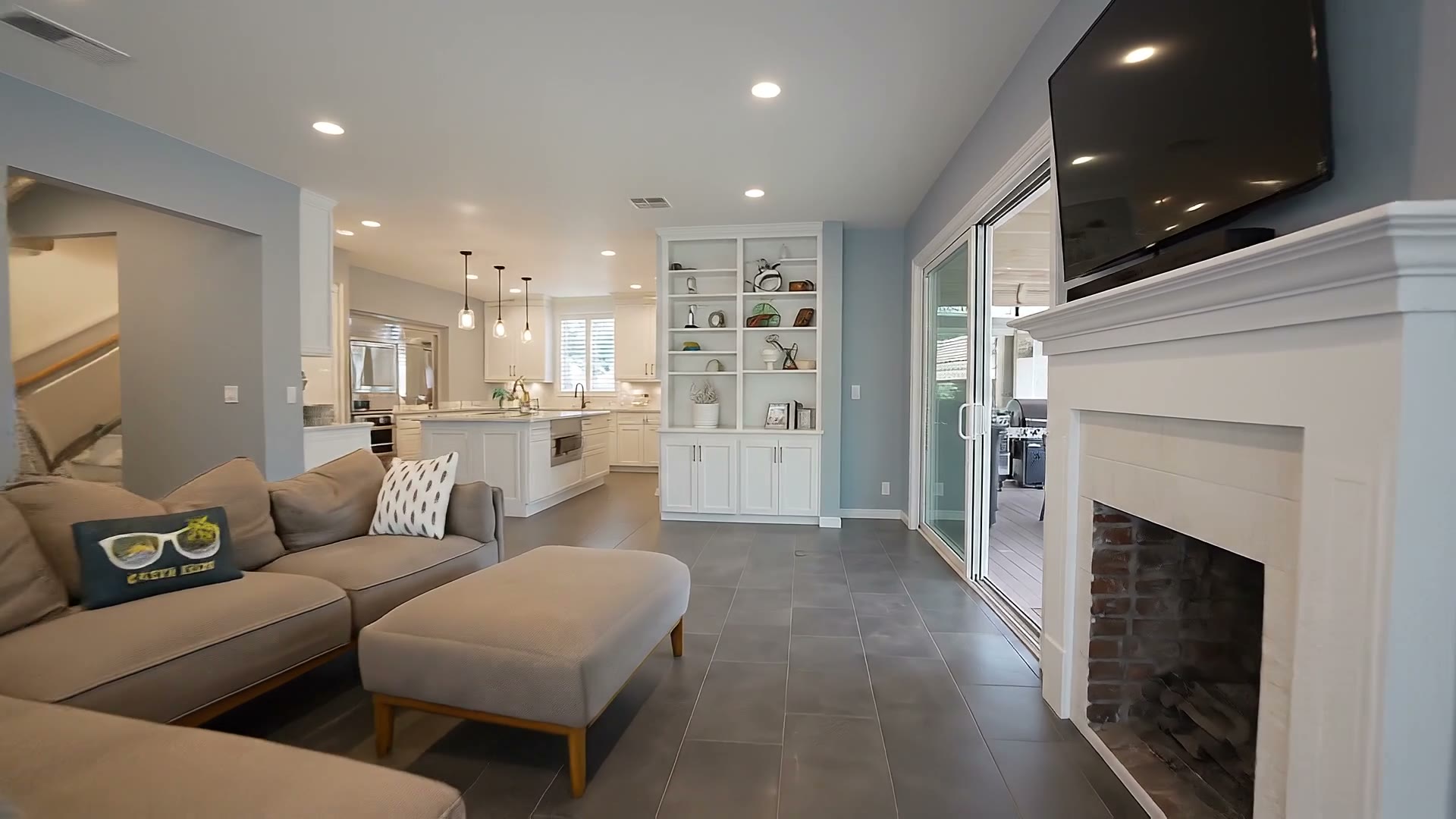
Frame from a finished ReelHive listing video
01 / REELHIVE
What ReelHive does for your next listing
Spend less time producing content and more time selling homes
ReelHive keeps the choices simple: pick your photos, set the presentation, and let the system do the rest
Less waiting
Prepare your marketing while the listing is ready to launch
AI-generated movement
Present rooms with animated views instead of a static gallery
No clip assembly
Leave transitions, music, and export to ReelHive
No subscription required
Buy for an occasional project or subscribe for regular production
Watch real ReelHive listing videos
Start with the full property tour, then explore interiors and exteriors in both formats
See the details up close
Watch the walls, windows, and furniture as the viewpoint changes
Landscape videos · 16:9
Vertical Reels · 9:16
These are existing ReelHive outputs, not matched AutoReel test samples; results vary by source photo
Why choose ReelHive as your AutoReel alternative?
No need to commit to a subscription or assemble clips by hand — see what your own listing photos can become first
| What you want to solve | How ReelHive helps | What that means for you |
|---|---|---|
| You only need an occasional video, not another recurring expense | How ReelHive helpsOne-time video packs start at $22 for one video, with allowances valid for 12 months | What that means for youBuy when you have a listing to promote, without a subscription |
| Your listing is ready to launch, but the video is not | How ReelHive helpsGeneration and assembly typically take about 2–5 minutes | What that means for youSpend less time waiting and get your marketing materials ready |
| You have the photos, but do not want to learn editing software | How ReelHive helpsAutomatic clip assembly, transitions, music, and export | What that means for youChoose your photos and presentation, then review and download |
| You want to see the results before paying | How ReelHive helpsCreate 2 free videos after signing up, with no credit card required | What that means for youTest with your own listing before deciding to buy |
Timing reference, checked September 26, 2026: ReelHive’s 2–5 minutes is our actual generation experience, from submitting a project to a downloadable export. AutoReel’s official FAQ gives 10–15 minutes. These are not a same-input benchmark or delivery guarantees; photo count and queue conditions affect either estimate
Try before you buy
Turn your own listing photos into a video for free and experience the motion, music, and finished export
Create my listing video free2 free listing videos · No credit card required

Give buyers a sense of the space
More than moving a photo — give buyers a moving view of the space
A slideshow pans or scales a still image. ReelHive’s scene-aware model generates animation and camera movement from the pictured room or exterior
- Follow the viewpoint
Notice how the perspective presents the layout
- Check the architecture
Compare walls, windows, and cabinetry with your originals; AI can introduce visual errors
- Fit your channel
Use landscape for wider viewing or portrait for social feeds

Keep your listing launch on track
Have marketing ready when you need it
Before starting, decide where the export will be used. That makes the format and photo order easier to choose
- New listing
Start with the exterior, then guide buyers through the main rooms
- Open house
Add the event details and a clear call to action
- Seller approval
Share the preview for feedback before posting

Review the result, not a timeline
No manual editing required
Your job is to choose the presentation and check the result, not trim or arrange individual clips
- Choose the sequence
Put the rooms in the order you would show them on a tour
- Keep the message clear
Include only the property details buyers need
- Download when ready
Preview the export and confirm the details before sharing
Listing photos to video: upload or import
Start in the AI real estate video maker; no separate editing app is needed
- 01
Add your photos
Upload images or import from Zillow, Realtor.com, or Redfin. Select photos you are authorized to use and put them in viewing order
- 02
Set the presentation
Choose Luxury, Modern, or Social, a 9:16 or 16:9 format, and music. Property details are optional
- 03
Preview and download
Check the export before publishing. Paid projects can include your logo and brand color
Make one video now, or save more with a plan
One-time packs come with 1, 3, or 5 videos, starting at $22. Purchased allowances remain valid for 12 months
For regular use, Essential monthly includes 3 videos for $49: about $16.33 each if you use all 3. Essential yearly costs $468 upfront, equivalent to $39 a month or $13 each across all 36 annual allowances. Yearly billing saves 20% compared with monthly. Growth and Pro include more monthly videos; check current plans and terms before buying
Compare ReelHive plans ↗Questions before choosing an AutoReel alternative
How long does generation take?
Usually about 2–5 minutes. Larger projects can take longer; the timing reference above explains the comparison
How is this different from a photo slideshow?
The AI generates movement from the image content, rather than just changing the crop or position of a still photo
Is there an AutoReel alternative without a subscription?
Yes. ReelHive offers one-time packs starting at $22 for one video
Do I need to edit the clips?
No. ReelHive handles assembly; you review the result before publishing
Can I import a listing link?
Yes. Public Zillow, Realtor.com, and Redfin property-detail pages are supported
How many photos can I use?
Up to 5 per free project, or 20 with paid subscriptions and one-time packs
Which formats are available?
Choose 9:16 for portrait or 16:9 for landscape
What does the free experience include?
Two trial videos, no credit card required. Free exports include ReelHive branding and lower output limits
Try it with your next property
Use two free videos to see whether ReelHive fits your workflow before choosing a pack or plan
Create my listing video free